alain
6 January 2025 18:33
1
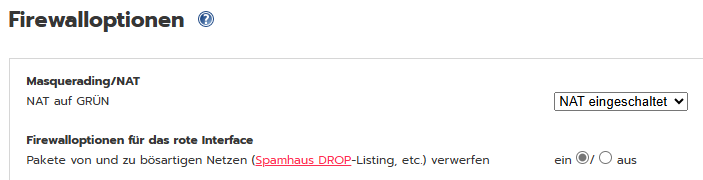
Hello. Under Firewall-options I can activate to drop packets to and from evil sites (Spamhaus Drop).
Furthermore I can activate Spamhaus Drop in IP address blocklists.
Does it make sense to activate both or is it not necessary to activate this blocklist when I have activated it in the firewall options? I don’t quite understand the difference between these to possibilities.
You could also select emerging-compromised.rules in the Emerging Threats ruleset for IPS and that will also do the same thing.
There isn’t much point in selecting more than one of these and I go with the Firewall Options one as that clears it out in the simplest way.
The IPS would be the last choice for me as that would use a lot more processing capability.
pscar13
5 May 2026 13:18
3
There are actually more options to use this list:
1 - Firewall IP Address Blocklists
2 - Firewall Options
The documentation indicates that the list is also managed by the XD country code.
3 - Location Block
This country can also be blocked with firewall rules.
4 - Intrusion Prevention SystemEmergingthreats.net Community Rules → emerging-drop.rules
What is the best way to use this list rationally and effectively?
Edit : The layering of IPFire features makes it increasingly difficult to make the right choices.