Core Update 196 released

Thanks for this update. I did a fresh install and reloaded my backup.

Everything works fine.

In the description of version 196, it is specified:

Misc.
Peer Dietzmann contributed a series of patches which will show for firewall hosts, groups and services in which firewall rules they are being used which will help to manage large sets of firewall rules easier.

Core Update 196 released

How these changes are visible ?

On the Firewall Groups page, eg the Hosts page, if you have entries that are being used then in the column headed Used there will be entries like 1 x or 3 x or 6 x.

Place you mouse pointer over the value you are interested in and wait for a short while and an info box will appear showing the firewall rule block and the firewall rule number in that block.

EDIT:
It will also show you if a particular Host entry is being used in another network/host group.

7 Likes

Thanks :+1:

1 Like

Thanks team. Muchly appreciated. Upgrade and reboot smooth as. Token donation made.

3 Likes

Thanks very much for the feedback and also for the donation. We appreciate it very much.

1 Like

Is there any chance of supporting RPI 5?

See the second half of this post from a couple of days ago.

https://community.ipfire.org/t/support-for-raspberry-cm5/14392/3

1 Like

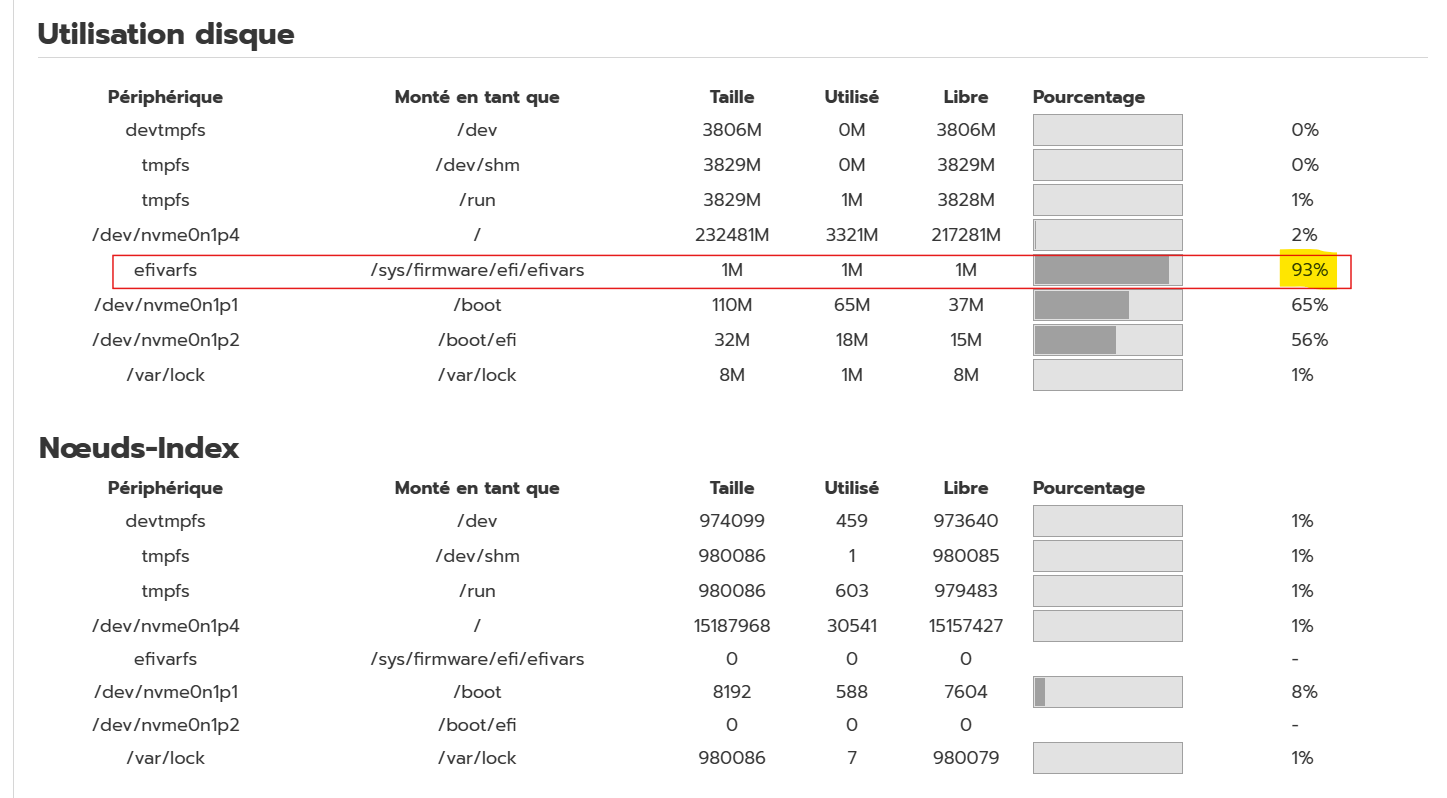
Hello dear community

Should I stay or should I go ?

BR

This about the space that your BIOS is offering for EFI variables. This should be pretty normal to be small and quite full. There is no way to change this. You can always update safely.

1 Like

Hi Michael
Thank’s for your answer.
Update done, efivarfs is now at 97 %
But what will happen for next update ?

BR

Nothing, you can safely update. IPFire won’t touch this. This is coming from your BIOS.

3 Likes

Hello,
if I boot the latest iso with qemu/kvm, I get a kernel panic: no working init found.
Can someone confirm? or is it my setup?
thanks

Hallo @linuxx

Welcome to the IPFire community.

I can’t confirm for qemu as I don’t use that but it boots fine with VirtualBox.

Is it safe to update now? I read about problems with changes to the firewall groups.

The only problem I am aware of with the firewall groups was related to the customservices file. That issue was found in Core Update 186 Testing and fixed before CU196 was even released.

1 Like

@Terry:

I am running it on 2 sites (including Wireguard and OpenVPN settings) and it runs great.

2 Likes

34 posts were split to a new topic: CPU Frequency Adjustment

I found the fault: newer Kernels need more memory. With 900 MiB instead 500 MiB everything is working.

See the IPFire documentation

https://www.ipfire.org/docs/hardware/requirements#memory

1 Like

Hi Michael

So I have upgrated to release 197 and of course /sys/firmware/efi/efivars was full
No problem at boot logon with IpFire

So I decided to have a look in the bios and I have unchecked this option Enable Legacy Option Roms

And now /sys/firmware/efi/efivars has decreased from 100 % to 46 %

Last question : do I need to activate secure boot in bios setup with IpFire ?

BR